
Internet Puerto Escondido Renters Guide: How to Check Starlink, Fibre, WiFi Speed and Power Backup Before You Pay Rent
Nov 23, 202611 min readUpdated Nov 28, 2026
This step-by-step guide shows you how to check internet Puerto Escondido rentals actually deliver before you hand over a deposit. In Propmex's 12-month review, 380 of 887 Puerto Escondido rental listings mentioned internet or WiFi, but only 9 stated a speed. Tenants have also told us about WiFi failing from day one. By the end, you'll know how to confirm Starlink or fibre at the exact address, what to ask the landlord, how to test the WiFi where you'll work, how to prepare for power outages, and what to put in your rental agreement.

Contents
Key Takeaways
- In Propmex’s 12-month review, 380 of 887 Puerto Escondido rental listings mentioned internet or WiFi, but only 9 stated a speed.
- The Starlink Mexico service-plan page listed Residential 100 Mbps at MXN 1,050 per month; availability and plans should be checked for the address.
- Zoom’s listed bandwidth for a 720p group video call is 2.6 Mbps down and 1.8 Mbps up.
- A January 17, 2026 report documented more than four hours without electricity or internet in Puerto Escondido.
- Losodeli lists a same-day coworking pass for MXN 150, with access from 7 a.m. to 10 p.m.
Step 1: Check internet Puerto Escondido service at the exact address
Finding out what hosts advertise is easy with a simple internet puerto escondido search, but it takes an address-specific check and an in-room test to know if the connection will fit your work. Begin by requesting the complete address, the connection type, the provider and plan, as well as a recent speed test taken inside the rental. Do not treat "fast WiFi" or a provider name as a guarantee of performance.
Starlink Puerto Escondido: what a listing really tells you
Searches like “starlink puerto escondido” commonly turn up rentals that name satellite service. In Propmex’s review of 887 Puerto Escondido rental listings over the last 12 months, 380 mentioned internet or WiFi. Among those listings, 276 named Starlink, 30 mentioned fibre, 4 mentioned Telmex, and only 9 stated a speed in Mbps. That makes “internet included” a poor substitute for a measured result.
What Puerto Escondido rental listings say about internet
Propmex data · Nov 2025 – Nov 2026
- Mention internet or WiFi380
- Name Starlink276
- Mention fibre30
- Mention Telmex4
- State a speed in Mbps9
listings
What Puerto Escondido rental listings say about internet. Mention internet or WiFi comes first at 380 listings, followed by Name Starlink (276) and Mention fibre (30). Source: Propmex data, Nov 2025 – Nov 2026.
Likewise, the neighbourhood figures are listing mentions, not provider coverage maps or measured speeds. In Propmex's sample, Starlink was mentioned in 44 of 62 La Barra listings (71%) and 34 of 53 Tamarindos listings (64%). It appeared in 50 of 96 La Punta listings (about 52%) and 32 of 63 Zicatela listings (about 51%). The shares were lower in Bacocho (10 of 47), Emiliano Zapata (8 of 25), Lázaro Cárdenas (5 of 25) and Centro (4 of 25). Use these counts as guides when questioning landlords, not as predictors of the service at a particular home.
If a landlord tells you they have Starlink, ask specifically about which equipment and plan they use, whether the dish and router are included in the rental, who pays the subscription, and whether others share the connection. Starlink's Mexico service page listed Residential 100 Mbps at MXN 1,050 per month and Residential Max at MXN 1,350 per month when reviewed. The 100 Mbps plan is capped at that download speed and is available only in selected areas. Check Starlink's current address eligibility and price rather than relying on your landlord's older plan or price. [1]
Fibre and cable coverage varies by address
A property's neighbourhood does not confirm that fibre reaches its building. If a listing mentions fibre or Telmex, request the exact address and ask the landlord to check the provider's availability before you pay. Telmex directs customers to check the technologies and services available at the specific address. Its fibre installation may require a cable route into the home and, in some cases, drilling. Get the owner's written approval for any installation or wall work, and agree beforehand who will arrange it. [3]
Ask whether the service is already installed and working, or whether the landlord expects you to order it after moving in. Ordering a new service is not the same as having a live connection on move-in day. Get the account holder's name, the installation status, the monthly charge and who is responsible for reporting faults in writing.
Use mobile data as a backup, not an assumption
A phone hotspot can help if the fixed connection fails, but first test your own SIM card inside the rental, at your desk and near the windows where you might work. Telcel's coverage map distinguishes guaranteed from non-guaranteed coverage and warns that buildings and other conditions can affect service. A coloured area on a map is no substitute for an indoor test. [4]
Ask your provider about the data allowance, how long it remains active, whether hotspot use is allowed and any charges once the allowance is used up. If you plan to use tethered access for video calls, try it during a call rather than assuming the signal bars on your phone tell you enough. For a family or several remote workers, a mobile connection may be useful as a backup, but it may not be a practical replacement for the main service.
Step 2: Ask the landlord specific internet questions
Before viewing or sending money for a deposit, ask questions that convert vague promises into checkable details. Propmex has a tenant inquiry asking, “What is the speed of the internet?” Follow it up with specific questions about the room, the plan and the number of people sharing the connection.
Send something short, such as:
Hello, I am interested in renting the unit and I work remotely. What type of internet is installed, and what are the download and upload speeds measured inside the bedroom or workspace? Could you please send a recent speed-test screenshot showing the date and time? How many people share the connection, and does the router or service have battery backup during power cuts?
Then clarify the practical issues:
- Is the internet included in the rent, or will I pay for it separately? If it is shared, how many rooms or tenants are connected?
- Is the router located inside the unit or in a common area? Can you work from the room you will rent, not only from a lobby or terrace?
- Who contacts the provider, pays for repairs and updates tenants when the service goes down?
- Is there a second connection, mobile hotspot, coworking membership or backup battery? Ask what equipment it powers and for how long.
- Can the landlord demonstrate the connection at a time when the house is normally occupied?
If you are booking from abroad, ask for a screenshot from the actual room, with the download and upload results visible. A screenshot can be useful evidence, but it does not show whether the router will be overloaded at your working hour or whether a power cut will interrupt your call. Ask whether the owner can do a short live video call from the workspace while running a speed test. If the answer is only “the WiFi is good,” keep asking before committing.
Step 3: Test puerto escondido wifi in your workspace
A hotel lobby test won't reveal what the signal is like in the bedroom you are renting. When viewing, bring the laptop and smartphone you use for work, connect to the rental's network and test from the desk or table where you would actually take calls. If you cannot visit, ask the host to repeat the same checks on a live call and send the results afterward.
Run a speed test at your working hour
Document the download, upload and latency of each test, and run it more than once. Your upload speed matters when you send your camera and voice to a meeting, so do not judge the connection by your download number alone. A test that measures network quality and latency[6] gives more context than a single headline speed. [6]
Compare this result with the software and work you actually use. For example, Zoom lists 2.6 Mbps down and 1.8 Mbps up[5] for a 720p group video call, and 3.8 Mbps down and 3.0 Mbps up for a 1080p group call. Those speeds are Zoom's stated bandwidth requirements, not an assurance that every shared home connection will keep the call smooth. Other people on the same connection, other devices and general network conditions can all affect your call. [5]
To document useful viewing tests, test at least at the hour you plan on working at home, repeat after another person in your house is streaming or on a call if possible, write down results along with time tested, room tested in, name of network used. If you normally transmit large files or conduct group calls regularly or have numerous employees working simultaneously at different locations throughout the property then ensure your test simulates the expected load so as to avoid depending strictly upon conducting only a basic one-to-one call test.
Make a real call and check the router
Conduct a five- to ten-minute video call from the spot where you plan to work. Turn your camera on, keep speaking, and ask someone else on the call to notice any frozen video, dropped audio or repeated reconnecting. Walk into the kitchen, bedroom or terrace you would typically use during the day and check whether the connection remains usable.
Find out where the router is and whether thick walls or several rooms separate it from where you plan to place your desk. Test at your desk location, not where the signal is strongest in the property. If the landlord says several tenants share the line, ask how many devices are normally active, and re-run the test when the home is busy. A strong signal icon does not necessarily mean reliable calls. The live test is what matters here.
Step 4: Prepare for power outages puerto escondido
When planning around power outages puerto escondido, split it into two questions: does the internet service itself work, and can the rental keep its network equipment powered? A Propmex tenant said Starlink worked well but cited repeated power cuts as the bigger problem. This is one renter's experience, not a schedule or a prediction for every neighbourhood.
A news article published on January 17, 2026, reported more than four hours without electricity or internet[7] in Puerto Escondido and nearby communities. One report alone cannot establish how often outages happen at your particular rental. Still, it is a reason to ask the landlord what has happened at that address and what backup is available. [7]
Ask about a UPS or battery backup
Ask your landlord to show you the backup working, with permission. Check which devices are connected, whether it powers both the modem or router and the Starlink equipment, and how long it has supported the network during a real outage. Starlink lists average AC input of 50–75 W[2] for its Standard equipment. It says these power figures include the Starlink equipment, WiFi router, power supply and cables, and that consumption varies by model and conditions. That gives you a basis for asking whether the battery is sized for the full setup, not just a router. [2]
Don't count on "there is a generator" as proof that your workspace stays online. Find out whether the generator starts automatically or manually, and which rooms and outlets it supports. Also find out whether the internet equipment is plugged into it. If the landlord tells you they will back up work calls, ask them to demonstrate this during a short call rather than testing someone else's electrical equipment yourself.
Don't depend on a fixed restart time for Starlink. Starlink's help guidance states that if the app shows "Booting," the system could be restarting or finishing startup. If it is downloading an update, that update can take 20 minutes[11]. That isn't a promise that every outage will resolve itself within 20 minutes. [11]
Make a backup plan for living in Puerto Escondido
Decide beforehand where you can work if your rental loses electricity or internet. A mobile hotspot will only help you as long as it has good signal inside and sufficient data to use. Some cafes are suitable for general work, but not all for a sensitive phone conversation. Check with the cafe about their working hours, power sockets available, noise levels and their calling policy before using it.
CFE says customers can report a power failure via its website or by calling 071, which operates 24 hours a day throughout the year[8]. Its report process asks for the service number and a complete address. So ask your landlord for the CFE service number, or agree now on who will file the report if the account is in the owner's name. [8]
Use puerto escondido coworking as plan B
If you need a reliable place to take calls, investigate coworking venues before signing your lease. Losodeli advertises fibre-optic internet backed up by Starlink at its Puerto Escondido coworking space and lists access every day from 7 a.m. to 10 p.m. It lists a same-day pass at MXN 150[9] and a seven-flexible-day pass at MXN 900. Verify current prices, access and availability directly with them before relying on them. [9]
Don't treat any coworking provider's advertised internet as more than its own description; it is not an independent service guarantee. Visit during the hours you normally work if possible, test a call from the desk you would use, and check the travel time from your rental. A backup workspace is useful only if you can reach it and use it when the outage happens.
Step 5: Put internet terms in the rental agreement
When your first workday arrives and the connection is unusable, a verbal promise is difficult to rely on. Propmex's anonymized tenant account describes how they paid a MXN 4,000 deposit and how the internet failed repeatedly from the first day. It does not prove that the deposit was lost, but it does show why tenants should confirm what is included before paying.
Request from landlords writing plain-language statements in any agreement:
- The kind of connection used, and whether internet service is included in the rent.
- Whether the connection is private or shared, and which room or workspace it must work in.
- Who pays the bill, who maintains the router or dish, who contacts the provider and who arranges a repair.
- What happens if the service repeatedly fails or is unavailable on move-in day: for example, an agreed repair deadline, a documented alternative connection, or a mutually agreed early-exit process.
- Whether renters may install or use their own modem, mobile hotspot or backup battery, and whether written permission is required for wiring or a dish.
Don't assume a failed internet connection automatically gives you the right to deduct rent, recover your deposit, or leave without following the contract. The Oaxaca Civil Code sections reviewed address the landlord's obligation to make repairs necessary for the rental's intended use and require tenants to notify landlords promptly about necessary repairs; those provisions do not spell out an internet-specific remedy. Before you sign anything, ask a local lawyer or tenant adviser to review any clause about rent reductions, deposit return or early termination. [10]
Retain all the documentation: the listing itself, the landlord's WhatsApp answers, speed-test screenshots, the signed agreement and any written repair requests. If the internet fails, report the issue in writing as soon as possible, include the date and what you tested, and save the reply. Having that record gives both parties a clear timeline and makes it easier to follow the repair or exit terms you agreed to.
Step 6: Next steps for a puerto escondido digital nomad
Use this checklist prior to making payment:
- Get the full address. Find out whether fibre or another fixed service is available at that exact home; do not assume coverage from the neighbourhood or a listing label.
- Ask for evidence. Request a recent download-and-upload speed test from the bedroom or desk, noting the date, time and usual occupancy.
- Test the actual work. Make a video call from the workspace and ask how many people share the connection.
- Check a backup. Test your mobile signal inside the rental and ask the owner to show any battery or generator setup that powers the internet equipment.
- Write down the deal. Put the connection, the bill, repair responsibility and agreed options for repeated failure in the rental agreement.
- Plan where to work. Research a nearby coworking space or other suitable venue and verify its current price and hours.
If a listing cannot answer basic questions, don't pay on an internet promise; ask for a viewing or more evidence instead. A practical puerto escondido digital nomad setup is more than a fast connection: it is a tested workspace, a clear agreement and a backup you can actually use. Look through Propmex's long-term rentals or post a rental request stating your required upload speed, private-versus-shared preference and power-backup needs up front.
Frequently Asked Questions
References
- 1Starlink | Planes de servicio
https://starlink.com/mx/service-plans
- 2¿Cuánta energía necesita mi Starlink? - Centro de ayuda de Starlink
https://starlink.com/mx/support/article/18836c7e-2d97-6153-fe67-c18427bd0558
- 3Preguntas frecuentes sobre Fibra óptica - Asistencia
https://e.telmex.com/web/asistencia/hogar-preguntas-frecuentes-fibra-optica
- 4Mapa de Cobertura Telcel | Consulta la Red 5G en México
https://www.telcel.com/personas/quien-es-telcel/sobre-nosotros/mapas-cobertura
- 5Zoom system requirements: Zoom Web App
https://support.zoom.com/hc/en/article?id=zm_kb&sysparm_article=KB0058323
- 6Speed test
https://developers.cloudflare.com/cloudflare-one/insights/dex/diagnostics/speed-test
- 7Apagón deja sin luz ni internet a Puerto Escondido y municipios cercanos - El Imparcial de Oaxaca
https://imparcialoaxaca.mx/costa/apagon-deja-sin-luz-ni-internet-a-puerto-escondido-y-municipios-cercanos
- 8Reporte de fallas en el suministro de energía eléctrica
https://www.cfe.mx/vun/Paginas/reporteFallaSuministroEnergia.aspx
- 9Coworking/Coliving | Losodeli
https://www.losodeli.com/coworking
- 10CODIGO CIVIL PARA EL ESTADO DE OAXACA
https://www.congresooaxaca.gob.mx/docs65.congresooaxaca.gob.mx/legislacion_estatal/Codigo_Civil_del_Estado_de_Oaxaca_(Ref_dto_2888_aprob_LXIV_Legis_22_oct_2021_PO_49_6a_secc_4_dic_2021).pdf
- 11App Says Starlink is Offline - Booting - Starlink Help Center
https://starlink.com/support/article/718b444d-e8c2-eeee-c214-beecc96e44ae
Looking for more articles?
Available Rentals
Properties currently listed in the area
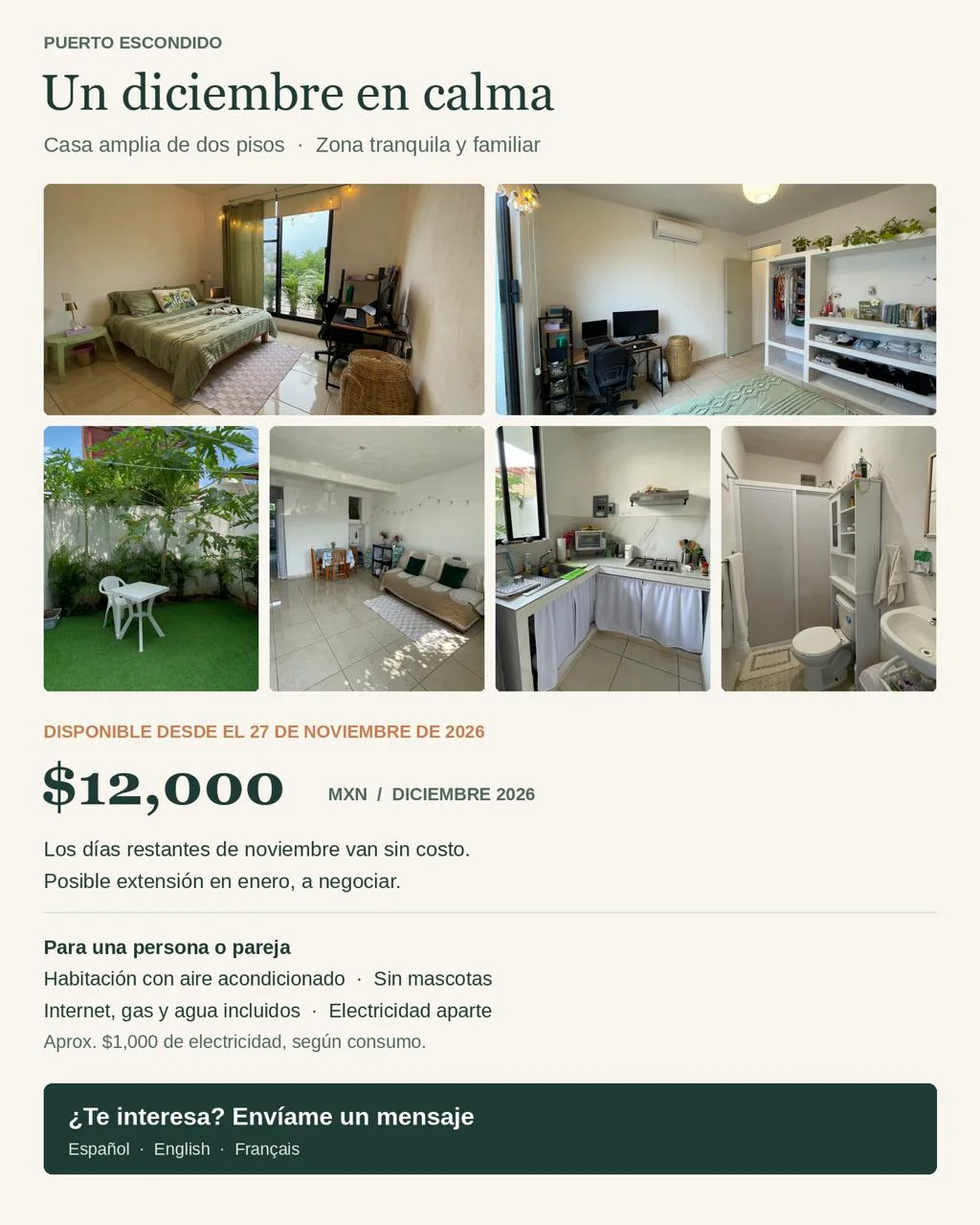
$12,000 MXN/mo
Brisas Diamante, Puerto Escondido
#### **🌴 Casa en renta disponible para el mes de diciembre, con posibilidad de extender la primera semana de enero, para una persona sola o pareja** ¿Buscas un lugar cómodo y seguro para descansar y disfrutar de Puerto Escondido a tu propio ritmo? Rento una casa **prácticamente nueva, amplia y acogedora**, ubicada en el fraccionamiento **Brisas Diamante**, una zona tranquila y familiar, cerca del aeropuerto y de varias playas. Es ideal para **una persona o una pareja** que busque un espacio para vivir con calma. El ambiente del fraccionamiento es pacífico y familiar, por lo que no es una casa orientada a fiestas. 🏡 **La casa tiene dos pisos:** - **Planta alta:** habitación con aire acondicionado y baño principal con regadera. - **Planta baja:** patio, cocina, sala de estar y baño de visitas. La renta incluye **internet, gas y agua**. 📅 **Disponible a partir del viernes 27 de noviembre de 2026.** Los días restantes de noviembre no tienen costo adicional. **Renta de diciembre: $12,000 MXN** La estanci
5 days ago
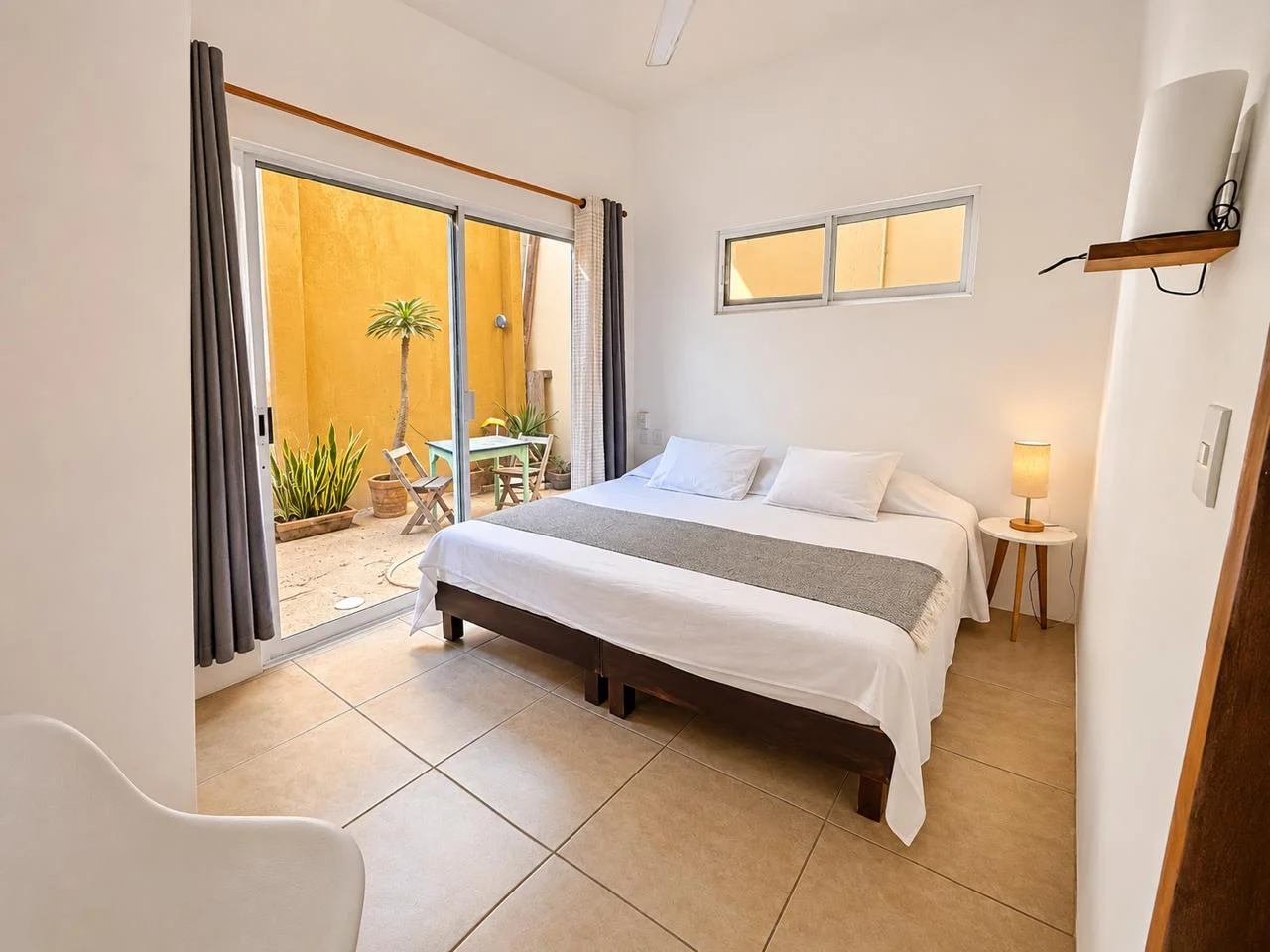
$13,500 MXN/mo
La Punta, Puerto Escondido
🏡 Departamento privado en renta a largo plazo – cerca cine zicatela. Acogedor departamento ideal para una persona o pareja, ubicado en la parte alta de La Punta, cerca del Cine Zicatela. ✨ El departamento cuenta con: * 🛏️ 1 recámara con AC * 🚿 1 baño privado con agua caliente * 🛋️ Pequeña sala * 🍳 Cocina * 🌿 Patio privado * 🔑 Espacio totalmente privado, sin áreas compartidas 👥 Capacidad máxima: 2 personas 🐶Aceptamos 1 mascota máximo 💰 Renta mensual: $13,500 MXN Depósito de garantía: 8000 MXN ⚡ Luz y gas a cargo del inquilino. 📅 Disponible para renta a largo plazo. 📩 Para más información: 954 100 83 63
2 days ago
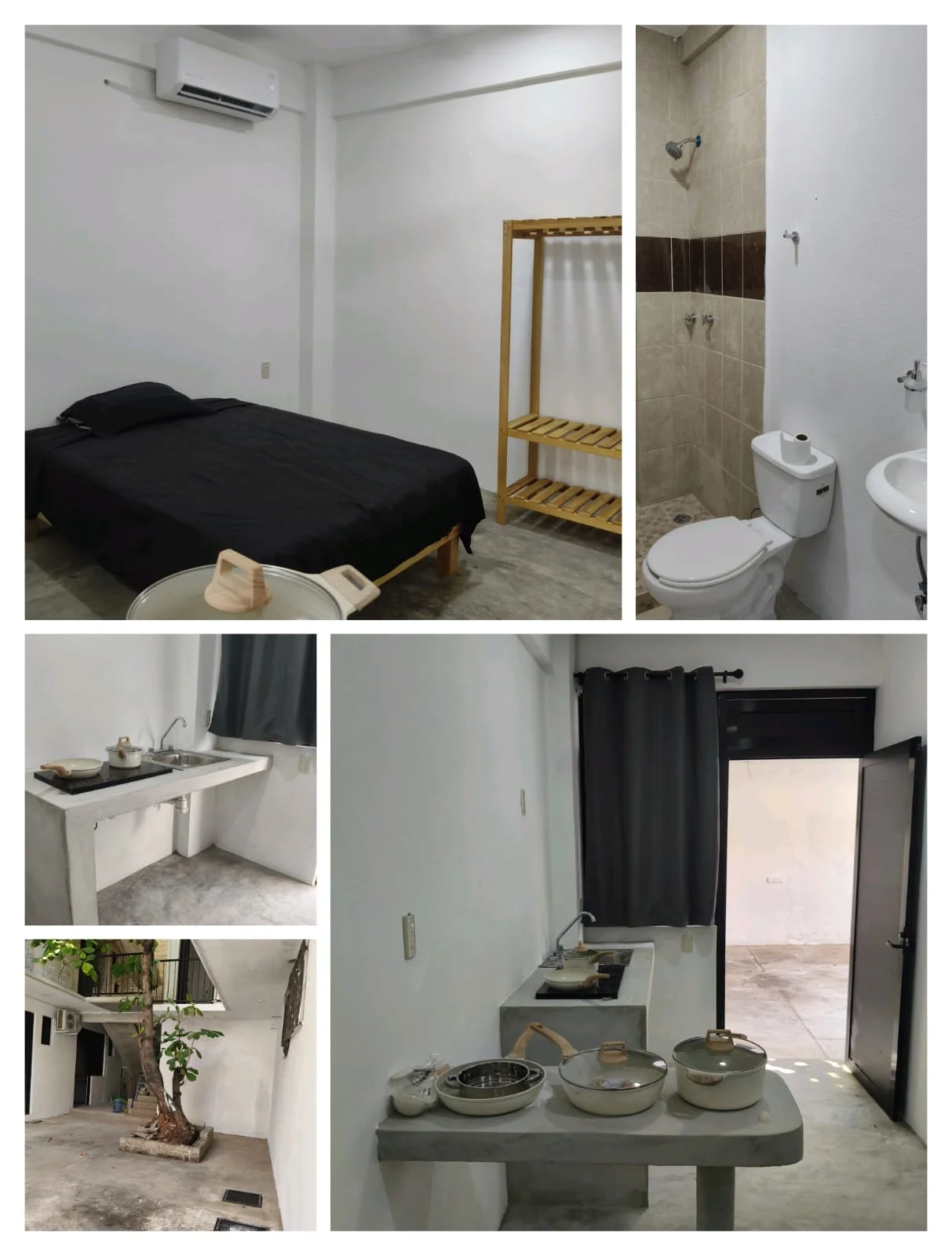
$8,000 MXN/mo
Centro, Puerto Escondido
Casa Centrika Tiene disponible 3 departamentos de 1 habitación con Ac semi amueblados planta baja Dos departamentos de dos habitaciones sin muebles con ac y estufa $12,000 segundo nivel. Departamento de 1 habitación tipo estudio Ideal para 2 personas máximo 📍 Centro ( cerca parisina , Comercial de Dani, Banco Azteca ) 🛌 Cama matrimonial 🪭 1 ventiladores de techo 🛜 internet fibra óptica Telmex 🏍️ Estacionamiento para motos ❄️ aire acondicionado 🍳 estufa 🚿 🚽 Baño privado solo agua fría por ahora 🗓️Precio mensua Depa 1 habl: $8,000 pesos no incluye pago de electricidad se requiere deposito de garantia. $5,000 Lo siento no mascotas 📲 Contáctame llamadas y whatsapp al 954 132 7070
9 hours ago